AboutTermsPrivacyContact
 
Updating
Waygo - Chinese, Japanese, and Korean Translator

Waygo - Chinese, Japanese, and Korean Translator

Released: 2012-03-10
© Translate Abroad, Inc
Waygo - Chinese, Japanese, and Korean Translator - QR Code
Version 6.17
4+
Download on the App Store
Version 6.17
4+
Download on the App Store
Released: 2012-03-10
© Translate Abroad, Inc

iPhone Screenshots

Screenshot
Screenshot
Screenshot
Screenshot
Screenshot

Description

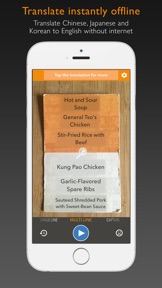
Waygo is the award winning leader in visual translation services, your offline travel translator and dictionary app for Chinese, Japanese and Korean. Our technology allows you to hover your phone's camera over foreign text and instantly translate and read that text in English.
Real customer reviews:
"It was my 'Life Saver' in my trip to China..."
"Using it now in Japan!. So worth the cost of unlimited translations..."
"A must for travel to China..."
"Happy User. Perfect! Very Useful!"
Perfect for travel in China, Japan and Korea, you can instantly read text using our visual translator and learn the language. No data connection needed. Translate Chinese, Japanese or Korean into English offline when traveling in Asia.
Why should I choose Waygo?
- Free to download and try with all languages and features included
- Instant offline OCR and translation that we built from the ground up
- Chinese, Cantonese, Japanese, Kanji, Korean
- Use your video camera as a visual translator or dictionary
- No data connection required
- Translate any menu or sign and never feel lost in translation again
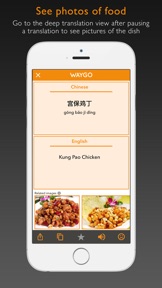
- See pictures of the food dish you are translating (Chinese only)
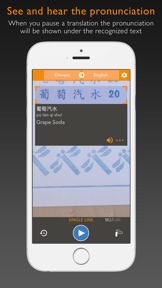
- See and hear the pronunciation of the words
- Simply point and translate foreign text to English
- Share your translations through SMS, Facebook, Twitter and Email
We have been featured repeatedly in ABC News, The New York Times, TechCrunch, The Next Web, BBC, Tech In Asia, GigaOm, Forbes, Technode, e27 and VentureBeat.
This free trial is limited to 10 daily translations. Select your language from the top menu. Upgrade to unlimited translations through the in app purchases in the settings menu.
Waygo Camera Translator is compatible with iOS devices running iOS 8.0 and up, as long as they have a rear-facing camera.
TIPS
1. Best used on clear Chinese, Japanese and Korean text (currently does not recognize stylized fonts or handwriting)
2. Intended for use on printed text, not computer screens
3. Designed for clear menus, signs and labels, not books or complicated text
4. If the text is small, hold the phone further away and use the zoom to translate more clearly
5. If text is blurry, tap the screen to focus
SUPPORTED LANGUAGES
- Chinese (Simplified) to English
- Chinese (Traditional) to English
- Japanese to English
- Korean to English
- more coming soon!
Go to www.WaygoApp.com/menu to try Waygo translator now on a sample Chinese menu.
FOLLOW US
* Twitter at https://twitter.com/#!/WaygoApp
* Facebook at https://www.facebook.com/WaygoApp
NOTE FROM THE DEVELOPERS
We appreciate your feedback. Please send any questions or suggestions to feedback@waygoapp.com

What's New in Version 6.17

This app has been updated by Apple to display the Apple Watch app icon.
* Bug fixes

Seller

Name

Translate Abroad, Inc.

Information

Categories

Version

6.17

Size

56.3 MB

Game Center

No

VPP Device Licensing

Yes

Rating

Rated: 4+

Compatibility

iOS 8.0 or later

Devices

iPhone 4S, iPhone 5, iPhone 5c, iPhone 5s, iPhone 6, iPhone 6 Plus, iPhone 6s, iPhone 6s Plus, iPhone SE, iPhone 7, iPhone 7 Plus, iPhone 8, iPhone 8 Plus, iPhone X, iPhone XR, iPhone XS, iPhone XS Max, iPhone 11, iPhone 11 Pro, iPhone 11 Pro Max, iPhone SE (2nd generation), iPhone 12, iPhone 12 Pro, iPhone 12 Pro Max, iPhone 12 mini, iPhone 13, iPhone 13 Pro, iPhone 13 Pro Max, iPhone 13 mini, iPhone SE (3rd generation), iPhone 14, iPhone 14 Plus, iPhone 14 Pro, iPhone 14 Pro Max, iPhone 15, iPhone 15 Plus, iPhone 15 Pro, iPhone 15 Pro Max, iPad 2 (Wi-Fi), iPad 2 (3G), iPad (3rd Generation) (Wi-Fi), iPad (3rd Generation) (4G), iPad (4th Generation) (Wi-Fi), iPad (4th Generation) (4G), iPad (5th Generation) Wi-Fi, iPad (5th Generation) Wi-Fi + Cellular, iPad (6th generation) Wi-Fi, iPad (6th generation) Wi-Fi + Cellular, iPad Pro, iPad Pro (Cellular), iPad Pro (9.7-inch), iPad Pro (9.7-inch) (Cellular), iPad Pro 12.9-inch (2nd generation), iPad Pro 12.9-inch (2nd generation) Wi-Fi + Cellular, iPad Pro (10.5-inch), iPad Pro (10.5-inch) Wi-Fi + Cellular, iPad Pro (11-inch), iPad Pro (11-inch) Wi-Fi + Cellular, iPad Pro 12.9-inch (3rd generation), iPad Pro 12.9-inch (3rd generation) Wi-Fi + Cellular, iPad Air, iPad Air (Cellular), iPad Air 2, iPad Air 2 (Cellular), iPad Air (3rd generation), iPad Air (3rd generation) Wi-Fi + Cellular, iPad mini (Wi-Fi), iPad mini (4G), iPad mini Retina, iPad mini Retina (Cellular), iPad mini 3, iPad mini 3 (Cellular), iPad mini 4, iPad mini 4 (Cellular), iPad mini (5th Generation), iPad mini (5th Generation) Wi-Fi + Cellular, iPad (7th generation) Wi-Fi + Cellular, iPad Pro 11-inch (2nd generation), iPad Pro 11-inch (2nd generation) Wi-Fi + Cellular, iPad Pro 12.9-inch (4th generation), iPad Pro 12.9-inch (4th generation) Wi-Fi + Cellular, iPad Air (4th Generation) (Wi-Fi), iPad Air (4th Generation) (Wi-Fi + Cellular), iPad (8th generation) Wi-Fi, iPad (8th generation) Wi-Fi + Cellular, iPad Pro 11-inch (3rd generation), iPad Pro 11-inch (3rd generation) Wi-Fi + Cellular, iPad Pro 12.9-inch (5th Generation), iPad Pro 12.9-inch (5th Generation) Wi-Fi + Cellular, iPad (9th Generation), iPad (9th Generation) Wi-Fi + Cellular, iPad mini (6th Generation), iPad mini (6th Generation) Wi-Fi + Cellular, iPad Air (5th generation), iPad Air (5th generation) Wi-Fi + Cellular, iPad Pro 11-inch (4th generation), iPad Pro 11-inch (4th generation) Wi-Fi + Cellular, iPad Pro 12.9-inch (6th generation), iPad Pro 12.9-inch (6th generation) Wi-Fi + Cellular, iPad (10th generation), iPad (10th generation) Wi-Fi + Cellular, iPad Air11M2, iPad Air11M2Cellular, iPad Air13M2, iPad Air13M2Cellular, iPad Pro11M4, iPad Pro11M4Cellular, iPad Pro13M4, iPad Pro13M4Cellular, iPod touch (5th generation), iPod touch (6th Generation), iPod touch (7th generation), Apple Watch Series 4, Apple Watch Series 5, Apple Watch Series 6 (GPS), Apple Watch Series 6 (GPS + Cellular), Apple Watch Series SE (GPS), Apple Watch Series SE (GPS + Cellular), Apple Watch Series 7 (GPS), Apple Watch Series 7 (GPS + Cellular), Apple Watch Series 8 (GPS), Apple Watch Series 8 (GPS + Cellular), Apple Watch SE (2nd generation) (GPS), Apple Watch SE (2nd generation) (GPS + Cellular), Apple Watch Ultra, Apple Watch Series 9 (GPS), Apple Watch Series 9 (GPS + Cellular), Apple Watch Ultra 2

Languages

English

App Store: Customer Ratings

Ratings & Reviews

3.8 of 5 (5 Ratings)

App Store: Customer Reviews

2018-03-19

Not good enough

The app cannot recognize some of the Chinese character, though it has been useful to some extent
Jimyunn
Version 6.17
2015-04-10

Not Even Opening after update

Previously I was enjoying this app and really helpful.
But unable to open after 9th April 2015 update.
I also tried to uninstall and reinstall the app. It's gonna off immediately after I choose my language option Chinese to English.
And now app is not even opening.
Really Bad Update
Chetan Pardeshi
Version 4.10
2015-01-20

Best translator

This is one of the best translator which i have used
Muks7
Version 4.03