Updating

iBingo Caller - Play Bingo at Home with Friends!
Released: 2011-01-19
© 2015 SyGem Limited


±0
±0
iPhone Screenshots

iPad Screenshots


Description
iBingo Caller - it's like being in a real bingo hall!! One of the world's most popular games, Bingo can be played by anyone from 3 to 103.
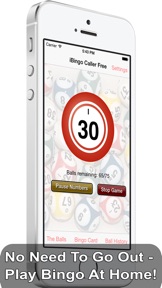
iBingo Caller features both 75 and 90-ball variants, 3 complete sets of high-quality bingo calls, and a full ball history. All you need are the Bingo tickets and you are ready to play.
FEATURES
======
- 75 or 90 Ball Mode
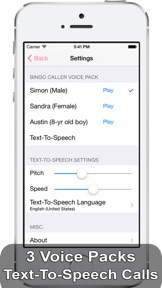
- 3 High-Quality Voice Sample Packs
- Text-To-Speech calling with 36 languages (iOS 7+)
- Animated Bingo Balls
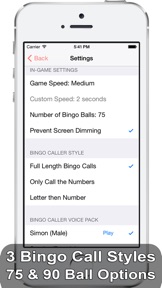
- 3 Bingo Call Styles
- Letter/Number (e.g. B11 or G47)
- Just the Numbers
- Full-length "British" calls
- Change the Game Speed
- Fast, Medium or Slow
- Choose your own speed from 0 to 10 seconds
- Manual Advance mode
- Full Ball History during Games
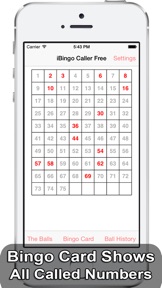
- Easy to read Bingo Card shows the Numbers
This bingo caller includes full voice samples for all of the 90 bingo calls, and short samples too. Three voice packs are included along with a Text-To-Speech bingo caller. The TTS feature works on iOS 7 and above, and currently supports 36 languages.
The game speed can also be changed, including a "Manual Advance" mode - ideal for playing with younger children! There is also a "Custom Speed" mode - choose your own speed, between 0 and 10 seconds between bingo calls.
Three types of bingo calling are available - full length "traditional" style calls (like "Clickety-Click, 66"), just calling the numbers or "Letter then Number" style - a much requested feature from our American users!
What's New in Version 1.8
This app has been updated by Apple to display the Apple Watch app icon.
- Added an option to stop the animated balls on the home screen. If you want the balls to be animated, you will need to enable the option in the settings.
- Increased the size of the in-game toolbar buttons
Seller
Name
SyGem Limited
Information
Developer
Categories
Version
1.8
Size
29 MB
Game Center
No
VPP Device Licensing
Yes
Rating
Rated 17+ for the following:
Frequent/Intense Simulated Gambling
Compatibility
iOS 5.1.1 or later
Devices
iPhone 3GS, iPhone 4, iPhone 4S, iPhone 5, iPhone 5c, iPhone 5s, iPhone 6, iPhone 6 Plus, iPhone 6s, iPhone 6s Plus, iPhone SE, iPhone 7, iPhone 7 Plus, iPhone 8, iPhone 8 Plus, iPhone X, iPhone XR, iPhone XS, iPhone XS Max, iPhone 11, iPhone 11 Pro, iPhone 11 Pro Max, iPhone SE (2nd generation), iPhone 12, iPhone 12 Pro, iPhone 12 Pro Max, iPhone 12 mini, iPhone 13, iPhone 13 Pro, iPhone 13 Pro Max, iPhone 13 mini, iPhone SE (3rd generation), iPhone 14, iPhone 14 Plus, iPhone 14 Pro, iPhone 14 Pro Max, iPad (Wi-Fi), iPad (3G), iPad 2 (Wi-Fi), iPad 2 (3G), iPad (3rd Generation) (Wi-Fi), iPad (3rd Generation) (4G), iPad (4th Generation) (Wi-Fi), iPad (4th Generation) (4G), iPad (5th Generation) Wi-Fi, iPad (5th Generation) Wi-Fi + Cellular, iPad (6th generation) Wi-Fi, iPad (6th generation) Wi-Fi + Cellular, iPad Pro, iPad Pro (Cellular), iPad Pro (9.7-inch), iPad Pro (9.7-inch) (Cellular), iPad Pro 12.9-inch (2nd generation), iPad Pro 12.9-inch (2nd generation) Wi-Fi + Cellular, iPad Pro (10.5-inch), iPad Pro (10.5-inch) Wi-Fi + Cellular, iPad Pro (11-inch), iPad Pro (11-inch) Wi-Fi + Cellular, iPad Pro 12.9-inch (3rd generation), iPad Pro 12.9-inch (3rd generation) Wi-Fi + Cellular, iPad Air, iPad Air (Cellular), iPad Air 2, iPad Air 2 (Cellular), iPad Air (3rd generation), iPad Air (3rd generation) Wi-Fi + Cellular, iPad mini (Wi-Fi), iPad mini (4G), iPad mini Retina, iPad mini Retina (Cellular), iPad mini 3, iPad mini 3 (Cellular), iPad mini 4, iPad mini 4 (Cellular), iPad mini (5th Generation), iPad mini (5th Generation) Wi-Fi + Cellular, iPad (7th generation) Wi-Fi + Cellular, iPad Pro 11-inch (2nd generation), iPad Pro 11-inch (2nd generation) Wi-Fi + Cellular, iPad Pro 12.9-inch (4th generation), iPad Pro 12.9-inch (4th generation) Wi-Fi + Cellular, iPad Air (4th Generation) (Wi-Fi), iPad Air (4th Generation) (Wi-Fi + Cellular), iPad (8th generation) Wi-Fi, iPad (8th generation) Wi-Fi + Cellular, iPad Pro 11-inch (3rd generation), iPad Pro 11-inch (3rd generation) Wi-Fi + Cellular, iPad Pro 12.9-inch (5th Generation), iPad Pro 12.9-inch (5th Generation) Wi-Fi + Cellular, iPad (9th Generation), iPad (9th Generation) Wi-Fi + Cellular, iPad mini (6th Generation), iPad mini (6th Generation) Wi-Fi + Cellular, iPad Air (5th generation), iPad Air (5th generation) Wi-Fi + Cellular, iPad Pro 11-inch (4th generation), iPad Pro 11-inch (4th generation) Wi-Fi + Cellular, iPad Pro 12.9-inch (6th generation), iPad Pro 12.9-inch (6th generation) Wi-Fi + Cellular, iPad (10th generation), iPad (10th generation) Wi-Fi + Cellular, iPod touch (3rd generation), iPod touch (4th generation), iPod touch (5th generation), iPod touch (6th Generation), iPod touch (7th generation), Apple Watch Series 4, Apple Watch Series 5, Apple Watch Series 6 (GPS), Apple Watch Series 6 (GPS + Cellular), Apple Watch Series SE (GPS), Apple Watch Series SE (GPS + Cellular), Apple Watch Series 7 (GPS), Apple Watch Series 7 (GPS + Cellular), Apple Watch Series 8 (GPS), Apple Watch Series 8 (GPS + Cellular), Apple Watch SE (2nd generation) (GPS), Apple Watch SE (2nd generation) (GPS + Cellular), Apple Watch Ultra
Languages
English
App Store: Customer Ratings
Ratings & Reviews
0.0 of 5 (No rating)
App Store: Customer Reviews
No Entry