AboutTermsPrivacyContact
 
Updating
Honk - Find Car, Parking Meter Alarm and Nearby Places

Honk - Find Car, Parking Meter Alarm and Nearby Places

Released: 2011-01-12
© 2011-2018 iStorm Apps
Honk - Find Car, Parking Meter Alarm and Nearby Places - QR Code
Version 1.7.0
4+
Download on the App Store
Version 1.7.0
4+
Download on the App Store
Released: 2011-01-12
© 2011-2018 iStorm Apps

iPhone Screenshots

Screenshot
Screenshot
Screenshot
Screenshot
Screenshot

iPad Screenshots

Screenshot
Screenshot
Screenshot
Screenshot
Screenshot

Description

= NYT Gadgetwise one of the top choices for Parking Apps!
= Essential App in Wired magazine's Apps Guide
= Top choice in the Car Find Category, AppAdvice.com
= Gizmodo.com : "Honk's the Swiss Army Knife parking app..can't really think of how it could get better.."
= App of the Week, iTunes App Store (UK)
= Cult of Mac : "a stroke of simple genius, and it’s not often you come across a one dollar app that could potentially save you a small fortune." [5 stars][Must Have App]
= 148apps.com : "there’s really no excuse not to buy honk, as it’ll save you a ton of money in future tickets" [5 stars]
= Macgasm.net : "Honk uses icon badges in a genius way."
= MacStories.net : ".. these map and sketch features alone refilled my like-meter."
= GPS Ratings : "yet another reason iPhone is such a life saver."
= New and Noteworthy & What's Hot & Staff Favorites in the App Stores around the world
= #1 Navigation in the UK & Russia; Top 5 Navigation App in the US App Store!
Honk is an App that saves you from another parking ticket with a swipe of your finger. It also help you find your way back to the car through its unique handwritten memo, photo, voice memo and automatic GPS functions. Newly added: a single tap, it will take you to the step-by-step walking instruction to your car!
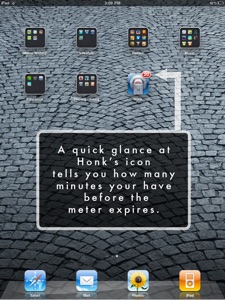
Honk also sports the widely praised "minute-by-minute" display of remaining time on the meter on its Icon badge. It even helps you locate nearby ATMs, cafes, Parking garages and, gas stations.
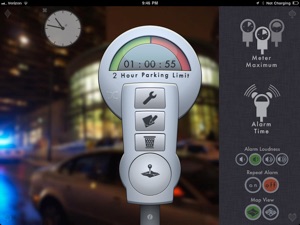
Simply swipe your finger across the meter to set how long you plan to park. As you quit Honk, it will mark your parking location on the map, and when the time comes to head back to your car, it will honk you. On your home screen, its icon will also display the remaining minutes. Just a quick glance, you can go back to your important conversation with a peaceful mind! It even features sync alarm/gps between your iPhone, iPad and even Macs via your cloud-shared Calendar!
Have you ever forgotten where you parked, and embarrassed yourself on the wrong floor, while your family had to follow you along one painful step after another. During winter in Boston? Overcomplicated controls in most apps make you feel like you are trying to heist a federal bank?
Use Honk's simple note pad to scribble down your spot, in a language of your choice, using the most trusted tool you have: your index finger. It also allows you to take a snapshot of your spot and superimpose the photo on your handwritten memo. Of course, Honk has a built-in map with useful functions to guide you safely back to your parked car.
Even if it save you from a few parking tickets, it pays you back 100 times over!
FEATURES:
- Simplest interface to set the parking meter alarm. A single swipe for most situations!
- Updates your remaining time on its App Icon. A quick glance at your home screen, your mind at peace.
- Smooth handwritten memo/photo/voice memo to mark the parking spot.
- Single tap takes you to the walking directions of Map to your car! (iOS7+ only)
- Honk marks parking location automatically when you set the meter alarm. Manually move the parking pin on the map when the GPS accuracy falls short. Shows how far the car is from your current location.
- Innovative bread-crumb trails to help quick orienting yourself as well as built-in compass.
- Different types of meter with long (up to 24 hours) and short time limits.
- Four levels of alarm sounds.
- Gorgeous background photos change according to the time of the day. Parallax effect! (for iOS7 and retina device users)

What's New in Version 1.7.0

With iOS 11, there are issues with the Map section while the alarm/alert function works fine.
While we are working on the major update slated for the Spring of 2018, we offer the original HONK for free. Thank you for your support over the many years.
In the mean time, the following description pertains to the pre-iOS11 users only.
----- New in version 1.7
New capability to use the step-by-step walking direction to the parking location
Choose Metric (m, km) system on/off in Honk Settings
Parallax effect for background image display
Completely redesigned built-in Help for more practical guidance (including the built-in 2 min tutorial video)
Voice memo recording limit increased to 2 minutes
Allows to keep a particular background image permanently
New background images optimized for retina display view
More robust iOS device sync operation using the Multipeer Connectivity
Extra text to display meter duration appears above the meter-head when the user swipes the meter
Fixed the bug that caused the app to crash when the Help button was pressed
Overall stability improvements

Seller

Name

Math Game House LLC

Information

Categories

Version

1.7.0

Size

60.4 MB

Game Center

No

VPP Device Licensing

Yes

Rating

Rated: 4+

Compatibility

iOS 7.0 or later

Devices

iPhone 4, iPhone 4S, iPhone 5, iPhone 5c, iPhone 5s, iPhone 6, iPhone 6 Plus, iPhone 6s, iPhone 6s Plus, iPhone SE, iPhone 7, iPhone 7 Plus, iPhone 8, iPhone 8 Plus, iPhone X, iPhone XR, iPhone XS, iPhone XS Max, iPhone 11, iPhone 11 Pro, iPhone 11 Pro Max, iPhone SE (2nd generation), iPhone 12, iPhone 12 Pro, iPhone 12 Pro Max, iPhone 12 mini, iPhone 13, iPhone 13 Pro, iPhone 13 Pro Max, iPhone 13 mini, iPhone SE (3rd generation), iPhone 14, iPhone 14 Plus, iPhone 14 Pro, iPhone 14 Pro Max, iPhone 15, iPhone 15 Plus, iPhone 15 Pro, iPhone 15 Pro Max, iPhone 16, iPhone 16 Plus, iPhone 16 Pro, iPhone 16 Pro Max, iPhone 16e, iPhone 17, iPhone 17 Pro, iPhone 17 Pro Max, iPhone Air, iPhone 17e, iPad 2 (Wi-Fi), iPad 2 (3G), iPad (3rd Generation) (Wi-Fi), iPad (3rd Generation) (4G), iPad (4th Generation) (Wi-Fi), iPad (4th Generation) (4G), iPad (5th Generation) Wi-Fi, iPad (5th Generation) Wi-Fi + Cellular, iPad (6th generation) Wi-Fi, iPad (6th generation) Wi-Fi + Cellular, iPad Pro, iPad Pro (Cellular), iPad Pro (9.7-inch), iPad Pro (9.7-inch) (Cellular), iPad Pro 12.9-inch (2nd generation), iPad Pro 12.9-inch (2nd generation) Wi-Fi + Cellular, iPad Pro (10.5-inch), iPad Pro (10.5-inch) Wi-Fi + Cellular, iPad Pro (11-inch), iPad Pro (11-inch) Wi-Fi + Cellular, iPad Pro 12.9-inch (3rd generation), iPad Pro 12.9-inch (3rd generation) Wi-Fi + Cellular, iPad Air, iPad Air (Cellular), iPad Air 2, iPad Air 2 (Cellular), iPad Air (3rd generation), iPad Air (3rd generation) Wi-Fi + Cellular, iPad mini (Wi-Fi), iPad mini (4G), iPad mini Retina, iPad mini Retina (Cellular), iPad mini 3, iPad mini 3 (Cellular), iPad mini 4, iPad mini 4 (Cellular), iPad mini (5th Generation), iPad mini (5th Generation) Wi-Fi + Cellular, iPad (7th generation) Wi-Fi + Cellular, iPad Pro 11-inch (2nd generation), iPad Pro 11-inch (2nd generation) Wi-Fi + Cellular, iPad Pro 12.9-inch (4th generation), iPad Pro 12.9-inch (4th generation) Wi-Fi + Cellular, iPad Air (4th Generation) (Wi-Fi), iPad Air (4th Generation) (Wi-Fi + Cellular), iPad (8th generation) Wi-Fi, iPad (8th generation) Wi-Fi + Cellular, iPad Pro 11-inch (3rd generation), iPad Pro 11-inch (3rd generation) Wi-Fi + Cellular, iPad Pro 12.9-inch (5th Generation), iPad Pro 12.9-inch (5th Generation) Wi-Fi + Cellular, iPad (9th Generation), iPad (9th Generation) Wi-Fi + Cellular, iPad mini (6th Generation), iPad mini (6th Generation) Wi-Fi + Cellular, iPad Air (5th generation), iPad Air (5th generation) Wi-Fi + Cellular, iPad Pro 11-inch (4th generation), iPad Pro 11-inch (4th generation) Wi-Fi + Cellular, iPad Pro 12.9-inch (6th generation), iPad Pro 12.9-inch (6th generation) Wi-Fi + Cellular, iPad (10th generation), iPad (10th generation) Wi-Fi + Cellular, iPad Air 11-inch (M2) Wi-Fi, iPad Air 13-inch (M2) Wi-Fi, iPad Air 13-inch (M2) Wi-Fi + Cellular, iPad Pro 11-inch (M4) Wi-Fi, iPad Pro 11-inch (M4) Wi-Fi + Cellular, iPad Pro 13-inch (M4) Wi-Fi, iPad Pro 13-inch (M4) Wi-Fi + Cellular, iPad mini (A17 Pro) Wi-Fi, iPad mini (A17 Pro) Wi-Fi + Cellular, iPad (A16) Wi-Fi, iPad (A16) Wi-Fi + Cellular, iPad Air 11-inch (M3) Wi-Fi, iPad Air 11-inch (M3) Wi-Fi + Cellular, iPad Air 13-inch (M3) Wi-Fi, iPad Air 13-inch (M3) Wi-Fi + Cellular, iPad Pro 11-inch (M5) Wi-Fi, iPad Pro 11-inch (M5) Wi-Fi + Cellular, iPad Pro 13-inch (M5) Wi-Fi, iPad Pro 13-inch (M5) Wi-Fi + Cellular, iPad Air11M4, iPad Air11M4Cellular, iPad Air13M4, iPad Air13M4Cellular, iPod touch (5th generation), iPod touch (6th Generation), iPod touch (7th generation), Apple Watch Series 4, Apple Watch Series 5, Apple Watch Series 6 (GPS), Apple Watch Series 6 (GPS + Cellular), Apple Watch Series SE (GPS), Apple Watch Series SE (GPS + Cellular), Apple Watch Series 7 (GPS), Apple Watch Series 7 (GPS + Cellular), Apple Watch Series 8 (GPS), Apple Watch Series 8 (GPS + Cellular), Apple Watch SE (2nd generation) (GPS), Apple Watch SE (2nd generation) (GPS + Cellular), Apple Watch Ultra, Apple Watch Series 9 (GPS), Apple Watch Series 9 (GPS + Cellular), Apple Watch Ultra 2, Watch10, Watch10Cellular, Watch11, Watch11Cellular, WatchSE3, WatchSE3Cellular, WatchUltra3

Languages

English

App Store: Customer Ratings

Ratings & Reviews

2.0 of 5 (1 Rating)

App Store: Customer Reviews

2015-10-28

Nice app but useless if Apple maps not working

Seems a good app but works only with apple maps. In my case the apple map direction are not working in my area hence it doesn't route me to my car. Very disappointed. Should have an option to select google map or other map as well.
Subhash Kamboj
Version 1.7.0
2011-05-17

not worth a dollar. you can use google maps to create your marker

the icon is not updated with the remaining time but it shows the initially configured minutes.
Shaikh M. Zaid
Version 1.1.0