AboutTermsPrivacyContact
 
Updating
System Status Pro: hw monitor

System Status Pro: hw monitor

Released: 2010-11-13
© 2018 Jiri Techet
System Status Pro: hw monitor - QR Code
Version 5.8.1
4+
Download on the App Store
Version 5.8.1
4+
Download on the App Store
Released: 2010-11-13
© 2018 Jiri Techet

iPhone Screenshots

Screenshot
Screenshot
Screenshot
Screenshot
Screenshot

iPad Screenshots

Screenshot
Screenshot
Screenshot
Screenshot
Screenshot

Description

An advanced tool for monitoring your iPhone and iPad performance.
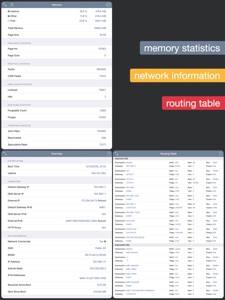
System Status provides graphical monitoring of all the device's resources such as CPU, memory, disk, battery and wifi/cell data usage. Further, it shows network-related info such as wifi/cell connection details and the routing table. Finally, System Status displays operating system details such as kernel version, memory page statistics and shows various hardware-related data.
BATTERY
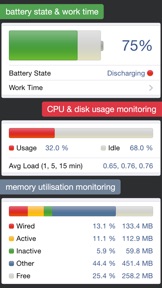
• Graphical battery level display
• Battery state monitoring (discharging, charging, full)
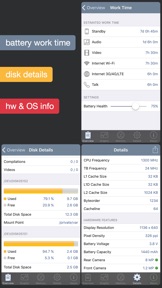
• Estimated battery work time for different usage patterns (standby, audio and video playback, Wi-Fi and 3G browser usage, talk time)
• Adjustable battery health to make the estimated work times usable for older batteries
MEMORY & DISK
• Real time memory usage monitoring - graphical display of wired, active, inactive, and free memory
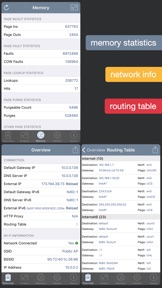
• Detailed page statistics including page ins and outs, page faults, page lookups, page purges and others
• Used and free disk capacity monitoring
• File statistics (number of songs, videos, podcasts, artists, genres, etc.)
• Mounted file system list
CELL & NETWORK
• 3G and Wi-Fi network connection information
• IP address of the current connection
• Carrier information such as network provider and MCC/MNC codes
• External IP address
• DNS server, default gateway
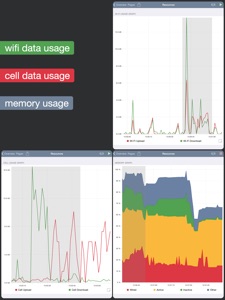
• Received and sent wifi/cell data since last boot
• Routing table
CPU
• CPU usage updated in real time
• Average load over the last 1, 5, and 15 minutes
OPERATING SYSTEM & HARDWARE INFORMATION
• System boot time and uptime
• Operating system and kernel version
• Device model and user name
• Detailed CPU and GPU information - model, core number, CPU and BUS frequency, L1, L2 cache sizes, and others
• Hardware features of the device including display resolution, pixel density, battery voltage, battery capacity, front and rear camera resolution and many more
RESOURCE GRAPHS
• Possibility to record up to 3 minutes of background activity
• Pinch to zoom & pan
• Play/pause to see real-time or history data
MORE
• Real time updates of the display every time the monitored parameters change
• Export by email, AirPrint, and AirDrop for most info
• Copy/paste support
• Detailed help
• Regular updates

What's New in Version 5.8.1

• Added the possibility to enable the location permission which is required to access SSID/BSSID since iOS 13
• Added support for latest devices
• Plots are drawn using a different plotting library as the previouls library stopped getting supported (there are minor differences in behavior in certain cases)
• Entering background/foreground is now shown in the plot using brown vertical lines with bg/fg labels
• Various fixes and improvements
• TODO: dark mode will be supported in the upcoming release

Seller

Name

Jiri Techet

Information

Developer

Categories

Version

5.8.1

Size

8.1 MB

Game Center

No

VPP Device Licensing

Yes

Rating

Rated: 4+

Compatibility

iOS 13.3 or later

Devices

iPhone 5s, iPhone 6, iPhone 6 Plus, iPhone 6s, iPhone 6s Plus, iPhone SE, iPhone 7, iPhone 7 Plus, iPhone 8, iPhone 8 Plus, iPhone X, iPhone XR, iPhone XS, iPhone XS Max, iPhone 11, iPhone 11 Pro, iPhone 11 Pro Max, iPhone SESecondGen, iPad (5th Generation) Wi-Fi, iPad (5th Generation) Wi-Fi + Cellular, iPad (6th generation) Wi-Fi, iPad (6th generation) Wi-Fi + Cellular, iPad Pro, iPad Pro (Cellular), iPad Pro (9.7-inch), iPad Pro (9.7-inch) (Cellular), iPad Pro 12.9-inch (2nd generation), iPad Pro 12.9-inch (2nd generation) Wi-Fi + Cellular, iPad Pro (10.5-inch), iPad Pro (10.5-inch) Wi-Fi + Cellular, iPad Pro (11-inch), iPad Pro (11-inch) Wi-Fi + Cellular, iPad Pro 12.9-inch (3rd generation), iPad Pro 12.9-inch (3rd generation) Wi-Fi + Cellular, iPad Air, iPad Air (Cellular), iPad Air 2, iPad Air 2 (Cellular), iPad Air (3rd generation), iPad Air (3rd generation) Wi-Fi + Cellular, iPad mini Retina, iPad mini Retina (Cellular), iPad mini 3, iPad mini 3 (Cellular), iPad mini 4, iPad mini 4 (Cellular), iPad mini (5th Generation), iPad mini (5th Generation) Wi-Fi + Cellular, iPad (7th generation) Wi-Fi, iPad ProFourthGen, iPad ProFourthGenCellular, iPad ProSecondGen, iPad ProSecondGenCellular, iPod touch (6th Generation), iPod touch (7th generation)

Languages

English

App Store: Customer Ratings

Ratings & Reviews

4.5 of 5 (11 Ratings)

App Store: Customer Reviews

2019-06-13

Smart App!

Really helpful info. A batt cycle count would've made it perfect!
Tanmaye-India
Version 3.1
2018-10-20

Perfect

Nice app
vikisri
Version 5.2.1
2015-02-19

Very Informative

Very Informative app Best for users with technical bend of mind
DineshWaghmare
Version 5.7.2
2015-02-03

Great app

So resourceful and well detailed. It is simply astounding!
SamThePayne
Version 2.2
2014-12-07

Sankar

Good useful App !
Schenker2012
Version 3.3
2012-12-01

Nicer

It is useful me and it is a great app
I use it daily ...
GoKs GoRa
Version 5.1.2
2012-08-20

Nice one

Designed nicely
Good one worth the buy for techo people
Mighty HARPOON
Version 3.5
2012-04-04

Good app

Simple and good system status app.
Makamar
2012-03-23

Very informative

Has lots of info, including the system processes. Nice neat no better app
i~nan
2011-11-22

Good one but...

Nice clean interface, Please add cellular data usage option in this app
SidTree
2011-04-30

Gud app!!!

Has most of the components of a system manager
Krisindia