Updating


iPhone Screenshots


iPad Screenshots




Description
MusicBox is the best way to save albums and songs for later. You can use it to keep track of new music you want to listen to later, catalog and organize favorite albums and songs, categorize music with tags, assign notes, manage metadata, and more.
MusicBox collects relevant metadata of albums and songs from Apple Music and Spotify, and is deeply integrated into the system with features such as Widgets, Share Sheet, Shortcuts, iCloud, and more.
ADD MUSIC
- Use the Share Sheet throughout the system.
- Drag and drop multiple albums and songs into the app.
- Add songs recognized by Shazam.
- Import multiple albums and songs by pasting their URLs into the app.
- Use the Add Music action in the Shortcuts app to integrate MusicBox into your automated workflows.
ORGANIZE YOUR ALBUMS AND SONGS
- Apply tags to categorize your music and make it easier to find.
- Use Auto-Tagging to automatically tag albums and songs based on rules you set.
- Deep Search allows searching your music by title, artist, genre, record label, tags, type, and notes.
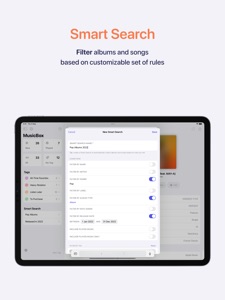
- Create a Smart Search to automatically filter albums and songs based on a set of rules.
- All MusicBox features and data are available on the Shortcuts app, so you can create custom shortcuts and automate your workflow.
- iCloud keeps your database in sync between your iPhone, iPad, and Mac.
LISTEN
- Easily access your music from the Home Screen with customizable Widgets.
- Play using the system's music player.
- Tap an album or song to open it on Apple Music or Spotify.
MusicBox is a modern app with support for the latest system features. It is also available on the Mac as a universal app, so you can enjoy it with a single purchase across iPhone, iPad, and Mac.
What's New in Version 1.0.1
Tags
• You can now create an Apple Music playlist from a tag. Press and hold a tag on the Start Screen (iPhone) or Sidebar (iPad), and choose "Create Playlist".
• Added a new modal view to manage an item's tags. Available in the context menu when we touch and hold an album or song.
• Added the option to count played albums and songs in the total number of items of each tag. Go to Settings > User Interface to configure.
• Added the ability to edit a Tag and Smart Search when long-pressing them on the Start Screen/Sidebar.
• Added the ability to create a new tag from the Manage Tags screen.
Add and Manage
• Added the ability to search and add albums directly from Apple Music.
• The Notes field now formats Markdown text. It accepts **bold**, *italic*, ~~strikethrough~~, `monospaced` and [link](https://apple.com) text.
• Added a search bar in the Batch Edit screen.
• The Batch Edit screen now allows you to select and edit items without having to tap the Edit button first.
Play Music
• Added Odesli as an option to view albums and songs.
• Added the ability to open albums and songs in Marvis Pro. Go to Settings > General > View Albums and Songs In to configure.
• Added a menu when we press and hold the View button to choose where to view the item (Odesli, Albums, Marvis Pro, or iTunes).
Shortcuts
• The Get Music shortcut now supports album covers. Set the Load Artwork parameter to true to enable. Note that this causes the action to run slightly slower and that large lists may reach the memory limit earlier.
• Added "Music ID" as an attribute to the Get Music shortcut response.
• Added new filter options to the Get Music shortcut: Type, Genre, Label, Released After, and Released Before.
• The Get Music shortcut now shows the number of items found when run.
Bug Fixes and Improvements
• Fixed a bug that caused the Open Details button from the context menu to not work.
• Fixed a bug that caused the extra-large widget to show fewer albums than what actually fits.
• The Send Feedback via Email action now uses the user's default mail app.
Seller
Name
Marcos Antonio Tanaka
Information
Developer
Categories
Version
1.0.1
Size
8.3 MB
Game Center
No
VPP Device Licensing
Yes
Rating
Rated: 4+
Compatibility
iOS 15.0 or later
Devices
iPhone 5s, iPhone 6, iPhone 6 Plus, iPhone 6s, iPhone 6s Plus, iPhone SE, iPhone 7, iPhone 7 Plus, iPhone 8, iPhone 8 Plus, iPhone X, iPhone XR, iPhone XS, iPhone XS Max, iPhone 11, iPhone 11 Pro, iPhone 11 Pro Max, iPhone SE (2nd generation), iPhone 12, iPhone 12 Pro, iPhone 12 Pro Max, iPhone 12 mini, iPhone 13, iPhone 13 Pro, iPhone 13 Pro Max, iPhone 13 mini, iPhone SEThirdGen, iPad (5th Generation) Wi-Fi, iPad (5th Generation) Wi-Fi + Cellular, iPad (6th generation) Wi-Fi, iPad (6th generation) Wi-Fi + Cellular, iPad Pro, iPad Pro (Cellular), iPad Pro (9.7-inch), iPad Pro (9.7-inch) (Cellular), iPad Pro 12.9-inch (2nd generation), iPad Pro 12.9-inch (2nd generation) Wi-Fi + Cellular, iPad Pro (10.5-inch), iPad Pro (10.5-inch) Wi-Fi + Cellular, iPad Pro (11-inch), iPad Pro (11-inch) Wi-Fi + Cellular, iPad Pro 12.9-inch (3rd generation), iPad Pro 12.9-inch (3rd generation) Wi-Fi + Cellular, iPad Air, iPad Air (Cellular), iPad Air 2, iPad Air 2 (Cellular), iPad Air (3rd generation), iPad Air (3rd generation) Wi-Fi + Cellular, iPad mini Retina, iPad mini Retina (Cellular), iPad mini 3, iPad mini 3 (Cellular), iPad mini 4, iPad mini 4 (Cellular), iPad mini (5th Generation), iPad mini (5th Generation) Wi-Fi + Cellular, iPad (7th generation) Wi-Fi + Cellular, iPad Pro 11-inch (2nd generation), iPad Pro 11-inch (2nd generation) Wi-Fi + Cellular, iPad Pro 12.9-inch (4th generation), iPad Pro 12.9-inch (4th generation) Wi-Fi + Cellular, iPad Air (4th Generation) (Wi-Fi), iPad Air (4th Generation) (Wi-Fi + Cellular), iPad (8th generation) Wi-Fi, iPad (8th generation) Wi-Fi + Cellular, iPad Pro 11-inch (3rd generation), iPad Pro 11-inch (3rd generation) Wi-Fi + Cellular, iPad Pro 12.9-inch (5th Generation), iPad Pro 12.9-inch (5th Generation) Wi-Fi + Cellular, iPad (9th Generation), iPad (9th Generation) Wi-Fi + Cellular, iPad mini (6th Generation), iPad mini (6th Generation) Wi-Fi + Cellular, iPad AirFifthGen, iPad AirFifthGenCellular, iPod touch (6th Generation), iPod touch (7th generation), Mac Desktop
Languages
English
App Store: Customer Ratings
Ratings & Reviews
0.0 of 5 (No rating)
App Store: Customer Reviews
No Entry