Updating


iPhone Screenshots




iPad Screenshots


Description
Tweek is a super fast and free to do list app to organize your tasks online with Google Calendar. A lightweight weekly planner to maintain your focus and boost productivity week over week
We’ve got the only calendar template — weekly. And, we’d say it’s the best week view to organize your life and work.
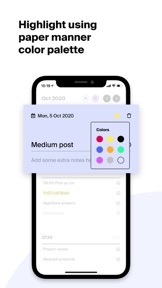
• Plan your week and paint it in a cozy highlighter-and-paper manner color palette.
• Your ultimate printable to do list template. Pin it to a wall, discuss it with your team, or present it to a client. Blank or real-time.
• Fulfill your daily workflow with notepad-like task descriptions.
• Unleash the productivity zen by having your favourite Google Calendar synced with ease.
Quickly shift tasks between days via our intuitive Drag and Drop interface.
Feel free to contact us if you have any questions — hello@tweek.so
What's New in Version 1.16
• Introducing Home Screen widgets
Now you can set up small or mid-size Tweek widgets on your Home screen.
• Tasks Notes and Checklists
Feel free to add rich-text task notes and checklists. You can use the notes feature to add whatever is required for a particular task.
• Fixed the appearance of a white screen after clicking the Continue with Apple / Continue with Google buttons.
We are constantly improving Tweek. This update also includes minor fixes and performance upgrades.
Seller
Name
SCADA SIA
Information
Developer
Categories
Version
1.16
Size
12.4 MB
Game Center
No
VPP Device Licensing
Yes
Rating
Rated: 4+
Compatibility
iOS 13.0 or later
Devices
iPhone 5s, iPhone 6, iPhone 6 Plus, iPhone 6s, iPhone 6s Plus, iPhone SE, iPhone 7, iPhone 7 Plus, iPhone 8, iPhone 8 Plus, iPhone X, iPhone XR, iPhone XS, iPhone XS Max, iPhone 11, iPhone 11 Pro, iPhone 11 Pro Max, iPhone SE (2nd generation), iPhone 12, iPhone 12 Pro, iPhone 12 Pro Max, iPhone 12 mini, iPad (5th Generation) Wi-Fi, iPad (5th Generation) Wi-Fi + Cellular, iPad (6th generation) Wi-Fi, iPad (6th generation) Wi-Fi + Cellular, iPad Pro, iPad Pro (Cellular), iPad Pro (9.7-inch), iPad Pro (9.7-inch) (Cellular), iPad Pro 12.9-inch (2nd generation), iPad Pro 12.9-inch (2nd generation) Wi-Fi + Cellular, iPad Pro (10.5-inch), iPad Pro (10.5-inch) Wi-Fi + Cellular, iPad Pro (11-inch), iPad Pro (11-inch) Wi-Fi + Cellular, iPad Pro 12.9-inch (3rd generation), iPad Pro 12.9-inch (3rd generation) Wi-Fi + Cellular, iPad Air, iPad Air (Cellular), iPad Air 2, iPad Air 2 (Cellular), iPad Air (3rd generation), iPad Air (3rd generation) Wi-Fi + Cellular, iPad mini Retina, iPad mini Retina (Cellular), iPad mini 3, iPad mini 3 (Cellular), iPad mini 4, iPad mini 4 (Cellular), iPad mini (5th Generation), iPad mini (5th Generation) Wi-Fi + Cellular, iPad (7th generation) Wi-Fi + Cellular, iPad Pro 11-inch (2nd generation), iPad Pro 11-inch (2nd generation) Wi-Fi + Cellular, iPad Pro 12.9-inch (4th generation), iPad Pro 12.9-inch (4th generation) Wi-Fi + Cellular, iPad Air (4th Generation) (Wi-Fi), iPad Air (4th Generation) (Wi-Fi + Cellular), iPad (8th generation) Wi-Fi, iPad (8th generation) Wi-Fi + Cellular, iPod touch (6th Generation), iPod touch (7th generation)
Languages
English
App Store: Customer Ratings
Ratings & Reviews
0.0 of 5 (No rating)
App Store: Customer Reviews
No Entry