Updating


iPhone Screenshots





iPad Screenshots




Description
Are you worried about your family members? Where they are going and what they are doing? Here is the solution and get free from this tension. This application will track your family members or friends and gives their latest location to you! Good to hear, isn’t it?
App Features:
> Track your family and friends in single screen instantly
> Get latest updated location of your family member
> Easy access to get authenticate Scan QR / User ID to track location
> Get to know who are tracking you right now and you can deny them to your location.
> Get detail location details of your family member with date, time, speed etc
> Your current location and place finder
HOW TO USE THIS APP?
To easy understanding consider you as a FATHER and you want to track your daughter’s current location.
1. Download and create your own account and login. (Required information: Name, Email ID, Password, Profile Picture).
2. Start Tracking your daughter with entering her User ID / scan her QR. (Your daughter must have this app and need to login with her credentials, She can also deny you to access her location by removing you from her whitelist).
NOTE that, If your daughter able to check that who are accessing her location and she can also able to deny those members.
QUESTIONS:
1. What type of information will you get after accepting a request?
Ans: After accepting request, FATHER(Consider above example to understand) will get,
His daughter is ideal or moving. If moving then what is her speed, Her Exact Location, Timestamp, Device name from where her daughter accessing/Logged in this app, Heading, Accuracy of location, and altitude.
2. How many members can I include for tracking?
Ans: You can track 2 members for FREE and then you need to buy package as per member requirements. Currently 3 pack is available for 5/7/10 member track request in minimum cost.
3. How to use it?
You need to create your own account and share your QR / User Id to whom you allow to track access your location. Same way you need to scan QR / user Id of your family members to get access of their latest location.
4. How to get my UserId / QR?
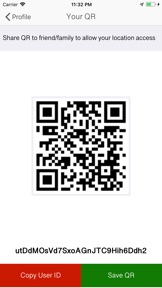
Login with your account > Go to Profile Screen > Go To 'Your QR' Screen. Here is your own QR and user Id below it. You can Copy user Id OR save QR to local storage also.
5. How To track my family member?
Install this app to all device you want to track and create individual login credentials. Login with your own account > Go To 'Profile' Screen > Go To 'Track By You' Screen > Click On Top Right QR Scan Button to Scan your family member QR or enter their user id manually. (You can track maximum 2 members for free. You can buy track pack based on member requirements.)
6. I need help / support from technical side.
Ans: Go to help center, You can directly Email to developer OR visit our web site. Or you also can join social page to discuss your problem.
IMPORTANT:
———
1. Continued use of GPS running in the background can dramatically decrease battery life.
2. This app will not send any personal data without your permission.
3. This app will access your current location and gallery to upload profile picture.
4. It never Encrypt / Decrypt personal data.
5. All tracking data is stored on secure server, There is no chance to have data.
What's New in Version 4.0
Compatible to latest iOS version
Minor bug fixed and performance improved
Seller
Name
Parth Pandya
Information
Developer
Categories
Version
4.0
Size
49 MB
Game Center
No
VPP Device Licensing
Yes
Rating
Rated: 4+
Compatibility
iOS 10.2 or later
Devices
iPhone 5, iPhone 5c, iPhone 5s, iPhone 6, iPhone 6 Plus, iPhone 6s, iPhone 6s Plus, iPhone SE, iPhone 7, iPhone 7 Plus, iPhone 8, iPhone 8 Plus, iPhone X, iPhone XR, iPhone XS, iPhone XS Max, iPhone 11, iPhone 11 Pro, iPhone 11 Pro Max, iPhone SE (2nd generation), iPhone 12, iPhone 12 Pro, iPhone 12 Pro Max, iPhone 12 mini, iPhone 13, iPhone 13 Pro, iPhone 13 Pro Max, iPhone 13 mini, iPhone SE (3rd generation), iPhone 14, iPhone 14 Plus, iPhone 14 Pro, iPhone 14 Pro Max, iPhone 15, iPhone 15 Plus, iPhone 15 Pro, iPhone 15 Pro Max, iPhone 16, iPhone 16 Plus, iPhone 16 Pro, iPhone 16 Pro Max, iPhone 16e, iPhone 17, iPhone 17Pro, iPhone 17ProMax, iPhone Air, iPad (4th Generation) (Wi-Fi), iPad (4th Generation) (4G), iPad (5th Generation) Wi-Fi, iPad (5th Generation) Wi-Fi + Cellular, iPad (6th generation) Wi-Fi, iPad (6th generation) Wi-Fi + Cellular, iPad Pro, iPad Pro (Cellular), iPad Pro (9.7-inch), iPad Pro (9.7-inch) (Cellular), iPad Pro 12.9-inch (2nd generation), iPad Pro 12.9-inch (2nd generation) Wi-Fi + Cellular, iPad Pro (10.5-inch), iPad Pro (10.5-inch) Wi-Fi + Cellular, iPad Pro (11-inch), iPad Pro (11-inch) Wi-Fi + Cellular, iPad Pro 12.9-inch (3rd generation), iPad Pro 12.9-inch (3rd generation) Wi-Fi + Cellular, iPad Air, iPad Air (Cellular), iPad Air 2, iPad Air 2 (Cellular), iPad Air (3rd generation), iPad Air (3rd generation) Wi-Fi + Cellular, iPad mini Retina, iPad mini Retina (Cellular), iPad mini 3, iPad mini 3 (Cellular), iPad mini 4, iPad mini 4 (Cellular), iPad mini (5th Generation), iPad mini (5th Generation) Wi-Fi + Cellular, iPad (7th generation) Wi-Fi + Cellular, iPad Pro 11-inch (2nd generation), iPad Pro 11-inch (2nd generation) Wi-Fi + Cellular, iPad Pro 12.9-inch (4th generation), iPad Pro 12.9-inch (4th generation) Wi-Fi + Cellular, iPad Air (4th Generation) (Wi-Fi), iPad Air (4th Generation) (Wi-Fi + Cellular), iPad (8th generation) Wi-Fi, iPad (8th generation) Wi-Fi + Cellular, iPad Pro 11-inch (3rd generation), iPad Pro 11-inch (3rd generation) Wi-Fi + Cellular, iPad Pro 12.9-inch (5th Generation), iPad Pro 12.9-inch (5th Generation) Wi-Fi + Cellular, iPad (9th Generation), iPad (9th Generation) Wi-Fi + Cellular, iPad mini (6th Generation), iPad mini (6th Generation) Wi-Fi + Cellular, iPad Air (5th generation), iPad Air (5th generation) Wi-Fi + Cellular, iPad Pro 11-inch (4th generation), iPad Pro 11-inch (4th generation) Wi-Fi + Cellular, iPad Pro 12.9-inch (6th generation), iPad Pro 12.9-inch (6th generation) Wi-Fi + Cellular, iPad (10th generation), iPad (10th generation) Wi-Fi + Cellular, iPad Air 11-inch (M2) Wi-Fi, iPad Air 13-inch (M2) Wi-Fi, iPad Air 13-inch (M2) Wi-Fi + Cellular, iPad Pro 11-inch (M4) Wi-Fi, iPad Pro 11-inch (M4) Wi-Fi + Cellular, iPad Pro 13-inch (M4) Wi-Fi, iPad Pro 13-inch (M4) Wi-Fi + Cellular, iPad mini (A17 Pro) Wi-Fi, iPad mini (A17 Pro) Wi-Fi + Cellular, iPad (A16) Wi-Fi, iPad (A16) Wi-Fi + Cellular, iPad Air 11-inch (M3) Wi-Fi, iPad Air 11-inch (M3) Wi-Fi + Cellular, iPad Air 13-inch (M3) Wi-Fi, iPad Air 13-inch (M3) Wi-Fi + Cellular, iPad Pro11M5, iPad Pro11M5Cellular, iPad Pro13M5, iPad Pro13M5Cellular, iPod touch (6th Generation), iPod touch (7th generation)
Languages
English, Chinese, French, German, Japanese, Russian, Spanish
App Store: Customer Ratings
Ratings & Reviews
5.0 of 5 (1 Rating)
App Store: Customer Reviews
No Entry